
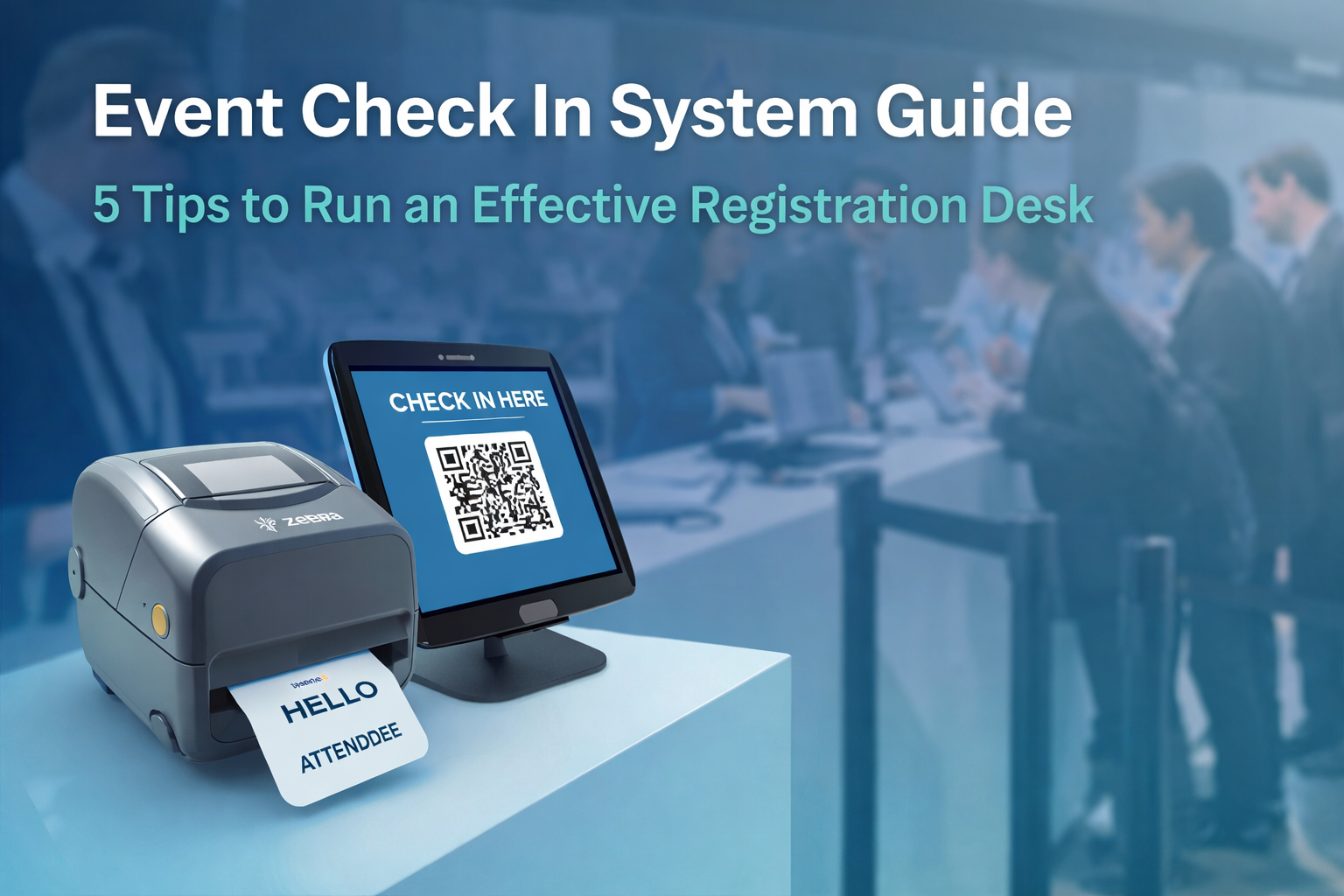
Running a fast and efficient event check-in system is critical to delivering a great first impression. Your event registration desk is the first touchpoint attendees experience, and delays here can quickly lead to long queues, frustration, and a poor start to your event.
Over the past 12 months, we have checked in and printed badges for more than 40,000 attendees across events in three continents. In 80 percent of cases, event teams managed the process themselves using our systems, without requiring onsite support.
This level of success comes down to more than just technology. While the right event check-in software and badge printing solution are essential, the real difference lies in planning, execution, and choosing the right partner. In this guide, you will learn how to improve your event check-in process, reduce queues, and run a seamless registration desk experience.
When it comes to the event check-in desk experience, many event managers believe that success depends mainly on the technology they choose.
While selecting the right technology is important, the most impactful factor is collaboration between you and your event check-in service provider.
A common mistake event managers make is assuming the service provider already knows exactly what to do. At a high level, this may be true. However, while the provider understands their technology, logistics, and team, they do not know the specific details of how your event’s check-in should operate. A strong service provider will ask questions and work closely with you to ensure expectations are aligned.
The foundation for a smooth check-in experience begins weeks before your event. If your service provider operates like we do, they will assign you a dedicated event success manager who schedules regular meetings for preparation and training. They will assign tasks and ensure they have everything needed to deliver the best possible service.
The role of the event success manager goes beyond simply training you on a system or collecting information. Their responsibility is to understand you, your event, and how you expect the process to run. They ensure that everyone involved understands their responsibilities, including the provider’s technical and onsite teams. They will also coordinate with your venue to confirm that equipment deliveries can be handled and that essentials such as internet, power, and tables are available to support the registration process.
That said, they can only do so much. You can help ensure a smoother process by following these five key principles:
One of the biggest challenges we see is that event managers are often under pressure and working with limited resources, making it difficult to give the registration desk the attention it deserves. However, this is the first impression your attendees will have of your event, and its purpose is to get them inside quickly and efficiently. It should not be treated as something to deal with later.
When you and your event check-in service provider work in alignment, they become a true extension of your event team.
Choosing a service provider with the right technology to support you and your event is just as important as strong collaboration.
For check-in, you need high quality badge printing at speed. The entire process, from check-in to badge printing, should take seconds rather than minutes.
Selecting an event check-in provider with the right hardware to deliver a seamless experience within seconds can be the difference between a full keynote room and long queues.
Your service provider should use badge printers designed for high volume use. Industry standards include the Epson C3500 or C4000e for full colour inkjet printing, or the Zebra ZD621 for thermal printing.
From a user experience perspective, the software should support hands free check-in using automatic barcode or QR code scanning. This allows the system to identify an attendee and print their badge without requiring them to press a button or use a keyboard.
In simple terms, you want a solution that can produce a badge from scan to hand in around five seconds.
Why is this important?
Speed matters. The faster you can print a badge, the faster attendees enter your event. Shorter queues lead to higher satisfaction.
The benefits extend beyond the attendee experience. Faster systems require less hardware, which reduces rental costs. They also improve efficiency in consumables such as ink and badge stock, while lowering transportation costs.
It is a win for both you and your attendees.
Our check-in kiosks can process between four and five people per minute when factoring in human interaction. That equates to between 240 and 300 people per hour for a single kiosk.
We regularly manage check-in for 600 attendees using just two kiosks, with average queue times of 90 seconds or less. In comparison, other providers may require four or five kiosks. This can result in approximately 3000 dollars in additional rental, shipping, and consumable costs.
What could you do with an extra 3000 dollars in your budget?
Once you have strong hardware and fast software, you have the foundations for a smooth experience. However, several less obvious challenges can arise once your event begins:
Software resilience
This is often overlooked. How does your provider’s software perform if the venue internet fails? Can it operate offline?
Data integrity
Attendees may register months in advance. By the time of the event, their details may have changed. If a badge prints incorrectly, the attendee will expect it to be fixed immediately. How do you handle real time data corrections and reprints? Do you have enough supplies? Can your system update information instantly?
Walk in registrations
Some attendees will arrive without registering. How will you manage them? Does your registration system sync with your check-in system, or will data need to be entered twice?
Unexpected resource challenges
If you rely on volunteers or temporary staff, have you planned for last minute absences? This is a common issue and can be difficult to resolve on the day of the event.
Resilience built in
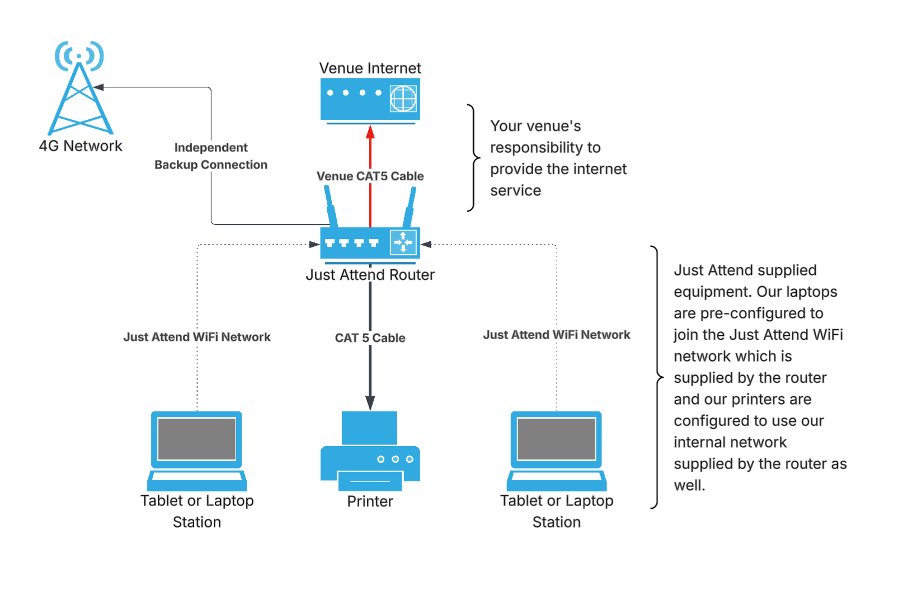
Our software is designed to handle internet disruptions. Each kiosk maintains a local copy of the registration list, updated every 15 seconds. If the connection to our servers is lost, the kiosk continues to process check-ins using the most recent data.
All check-in activity is stored locally and uploaded once the connection is restored. This ensures your check-in desk continues operating even if the venue internet fails.
For larger events, we can deploy a dedicated wired and wireless network. Our printers connect directly to our router, while tablets and laptops use a private wireless network. This prevents performance issues caused by increased demand on the venue network.
Our system also includes a mobile data backup, allowing operations to continue during a full internet outage, provided there is mobile signal.
If power availability is limited, we can also supply battery power solutions to keep your check-in running independently.
Data integrity
Incorrect badge details are one of the most common causes of delays. Without a clear process for corrections, queues can build quickly.
We address this in two ways:
These features help maintain queue flow, reduce waste, and improve the attendee experience.
Walk in registrations
Walk in attendees often reach the kiosk without knowing how to register. To support self-service, a registration QR code can be displayed on the kiosk screen. Attendees can scan it with their phone, complete registration, and then proceed to print their badge.
Alternatively, you can operate a dedicated registration desk where staff can register attendees and send badges directly to print.
Resource efficiency
Staff shortages can disrupt your event check-in desk. Our kiosks are designed to be simple, fast, and self-service, reducing the need for large teams.
One team member can manage up to four kiosks, compared to one person per station with less efficient systems. This reduces staffing costs, lowers risk, and improves overall event efficiency without compromising the attendee experience.
Event organizers have many options when it comes to choosing a badging service provider. At first glance, many of these providers appear to offer similar solutions, so how do you decide which one is right for you?
From what we see in the market, the most common factors influencing selection are cost and how close the provider is to the venue. Other considerations often include well known industry names, as event managers may assume that a larger company guarantees better service, while smaller providers are seen as a greater risk.
In reality, these factors are not the most important when selecting the right partner. Instead, there are several warning signs you should be aware of:
If the answer to any of these questions is yes, you should carefully consider whether that provider is the right choice.
When responsibility is divided across multiple parties, accountability becomes unclear. This makes it much harder to get the support you need, especially under pressure.
If your event check-in is opening in 20 minutes, you do not want to rely on email support with a 24-hour response time. If hardware arrives damaged or incomplete the day before your event, you cannot afford to wait while your provider coordinates with a rental partner to resolve the issue.
Unexpected costs are another common problem. You may receive an invoice shortly before your event that is significantly higher than expected because key items were excluded from the original quote. In some cases, essential components such as ink, badge stock, or even the check-in software itself may not be included at all.
Onsite support can also be misleading. You may believe you are covered by paying for technical support, only to find that the person onsite lacks experience and must contact a remote support team to resolve basic issues.
These situations are more common than you might think. We have seen them happen many times, and not just with smaller providers. When they occur, you are left to resolve the problem with limited time and resources. Your attendees feel the impact, and your reputation is put at risk.
What you need is a provider that owns the entire solution from start to finish. This includes software, hardware, staff, and logistics. You need a partner who works closely with you, identifies potential gaps early, and treats your event with the same level of care as their own.
At Just Attend, this is exactly how we operate. We have built our service to address the shortcomings we have seen across the industry, creating a solution focused on efficiency, reliability, and ease of use while delivering cost savings without compromise.
When you choose Just Attend, you are not simply booking an event check-in system. You are investing in a complete solution designed by an event manager to remove the stress from event check-in so you can focus on the rest of your event.
Here is how we do it:
Now that you have selected the right solution and service partner for your event check-in, you have the foundations for a seamless and reliable badge printing experience.
However, even the best planning and technology depend on strong execution when it matters most. Here are five practical tips to help make your event check-in smooth and stress free.
1. Set up and test in advance
Never leave your check-in desk setup until the morning of your event. Doing so exposes you to unexpected issues such as internet connectivity problems or hardware failures. Early morning setups also limit access to support, as venue technicians or your service provider may not be available at that time.
Instead, complete your setup the day before. This gives you the time and space to prepare properly and ensures that support is available if needed. It also allows you to test your system, confirm badge quality, and run training sessions with your team.
2. Design your setup around attendee flow
Placing desks in the middle of a foyer without a clear plan often leads to congestion and confusion. Attendees may need to double back, creating bottlenecks and unnecessary stress for both staff and guests.
Instead, consider how attendees will enter the venue and where they need to go next. Position your check-in desk in line with this natural flow, allowing people to enter from one side and exit from the other. This creates a smoother and more intuitive experience.
3. Use open ended lanyards with crocodile clips
Once an attendee has printed their badge, it is important to keep them moving so the next person can use the kiosk. Delays often occur when attendees struggle to attach their badge using clips that are difficult to handle.
Open ended lanyards with crocodile clips are quicker and easier to use. They reduce the need for fine handling, minimise the risk of badge damage, and help maintain a steady flow through the registration area.
4. Plan for walk in attendees
On average, around five percent of attendees will arrive without a ticket. These individuals may join the main queue, only to discover they cannot register at the kiosk, causing delays for others.
To avoid this, set up a dedicated area for onsite registration. This could be a staffed desk or specific terminals for registration. Clear signage will help direct these attendees to the correct location and keep your main check-in queue moving efficiently.
5. Manage the crowd effectively
One of the most important factors in fast and efficient check-in is crowd management.
Clearly define kiosk lanes using barriers, ensure each station is well signposted, and make your team easy to identify with visible clothing.
Assign team members to welcome attendees and guide them into the correct lanes. This helps distribute people evenly across kiosks and prevents congestion near the entrance.
By following these five tips, you can achieve a processing rate of four to five attendees per minute per kiosk, which is more than 300 people per hour for each kiosk.
If you would like advice on how to improve your event check-in process, get in touch with our team. We are happy to talk through your event and help you find the best approach.
An event check-in system is a combination of software and hardware used to register attendees as they arrive. It typically includes kiosks, badge printers, and scanning tools that allow attendees to check-in quickly and print their badges onsite.
A well optimised event check-in process should take around five seconds per attendee from scan to badge in hand. Faster check-in reduces queues and improves the overall attendee experience.
The most effective ways to reduce queues include using fast badge printing technology, enabling hands free QR code scanning, planning attendee flow, and ensuring enough kiosks are available based on expected volume.
You typically need badge printers, check-in kiosks or tablets, barcode or QR code scanners, badge stock, and lanyards. High volume printers such as inkjet or thermal badge printers are commonly used for professional events.
This depends on attendee volume, but as a general guide, one kiosk can process between 240 and 300 attendees per hour. You should plan capacity based on peak arrival times rather than total attendance.
Yes, some advanced systems can operate offline using locally stored attendee data. Once the internet connection is restored, the system syncs automatically. This ensures check-in can continue even if the venue connection fails.
Look for a provider that offers a complete solution including hardware, software, and support. They should not rely heavily on third parties, and should provide fast, reliable systems with clear pricing and strong onsite or remote support.
Unique Attendees
Sessions Delivered
Exhibitor Leads Generated
Badges
Printed